Posts

Send Gmail using Dot NET

Hi, in my previous posts, I have posted how to send mail using the Java API. In this section, I would like to demonstrate on how to send mail using Dot NET. Using Dot NET, it is equally easy to send mail. In this post I would use my Dot NET application to connect with Google's outgoing mail server (Google's SMTP server) and use that to forward my mail. (In my previous post, I've demonstrated on sending mail using my own SMTP server which ran on my machine. In this scenario, it will directly put the outgoing message into the Gmail's SMTP server) You will be using mainly few Classes to get the job done. System.Net.Mail.MailMessage System.Net.NetworkCredential System.Net.Security.SmtpClient These classes will provide the basic methods to get the job done. You will also be using System.Net.Mail.MailAddress class. (Though there is a way to get the job done without actually needing this.) First of all, you need to import the namespaces. using System....
Download File using Dot Net

In this post, I will demonstrate how easy it is to download a file from a web server to your local hard drive. In most scenarios, you may browse the net using your web browser and click on a hyperlink to start a downloading of a file from a remote site. Some of you may be interested in how to download this using their application code using Dot Net. This can be very easily achieved using the WebClient class under System.Net namespace. First, import the System.Net namespace. using System.IO; The above LOC will do so. Now, create an instance of WebCleient class. WebClient client = new WebClient(); Now, call the DownloadFile method client.DownloadFile(<url>, @"<fileDestinationName>.<filetype>"); Have fun. Cheers !!!!

ASP Response.Write newline

Hi, all of you who have used ASP may have encountered situations where you require to write a text output to the screen. It can be easily done by using Response.Write("Hello world"); However, if you wish to append some more text to a newline, it would not work in the following ways. Response.Write("Hello world \n"); Response.Write("Good day."); The output of the above lines would be Hello world Good day. and NOT Hello world Good day. In order to overcome this, you can very simple place an html break tag inside the code. Response.Write("Hello world"); Response.Write("<br/>"); Response.Write("Good day."); The output would be the following. Hello world Good day. Cheers !!!

Browser addressbar icon (favicon)

Image
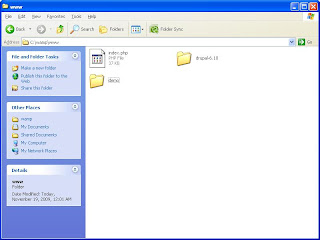
Hi, all of you must have noticed that when you visit a website with your browser, the image on the left of the addressbar changes. First of all lets define its correct term. It is known as the 'favIcon'. In this post, I wish to demonstrate how to add such a favicon to your website. To try this out, you would need a web server such as IIS, Apache or Tomcat. I'm using WAMP's Apache server for the demonstration. First of all, you'll need an image of dimension 16x16. You can use windows paint to do this. Save it in Windows 16 colors. If you need to do this quickly, you can use the following website , which will generate a favicon from a given image. Save the image as favicon.ico. Now, copy and paste this on your web server root directory of the application. The folder structure of WAMP is based in a way such that the web applications need to be deployed in the folder named "www". (The complete path for this is "C:\wamp\www") Now, create a separate f...

ASP Regular expression to check length of textbox value

Hi, here is a regular expression validator in ASP which you can use to check if a certain textbox has less than a certain number of characters. <asp:regularexpressionvalidator runat="server" id="lengthRegex" controltovalidate="">" validationexpression=".{1,<n>}" errormessage="Please note that there should be less than <n> number of characters in the textbox"> </asp:regularexpressionvalidator> So, if you intend to make the textbox accept a number of characters in a range(say between 5 to 10) then the following changes would work <asp:regularexpressionvalidator runat="server" id="lengthRegex" controltovalidate="">" validationexpression=".{5,10}" errormessage="Please note that there should be between 5 to 10 characters in the textbox"</asp:regularexpressionvalidator> Suppose you need to limit the characters to only alphanumerics, then use the...

URL Regular Expression

Here is a good Regular Expression for evaluating a URL (http(s)?\:\/\/)?([\w_-]{2,}\.)+([\w_-]{2,})((\/)(\~)[\w_-]+)?((\/)[\w_-]+)*((\/)¦(\/)[\w_-]+\.[\w]{2,})?((\?[\w_-]+\=([^\#]+)){0,1}(\&[\w_-]+\=([^\#]+))*)?(#[\w_-]+)?

Java Sorting Arrays

Hi, All you Java folks must have faced a situation where you require to sort an array of custom objects using Java. Sorting a string array is easy with Java. But, what happens when you have a custom object array, say an array od Person objects to sort. You need to sort them according to a specific custom condition. With java interfaces, this becomes easily doable. In this example I will use the custom object as 'Car' public class Car { int age; string id; string color; } I need to sort them according to the age. Thus, according to the ascending order. First, you need to implemet Comparable interface of java. public class Car implements Comparable { int age; string id; string color; } So, add the above code in Red. This tells that this class implements the Comparable interface and accepts Car objects only. Now, you need to actually implement the methods regarding the interface. public int compareTo(Car o) You must implemen...